


Start here
A few places to begin, from the aircraft’s story to the people who fly it.
Meet the aircraft
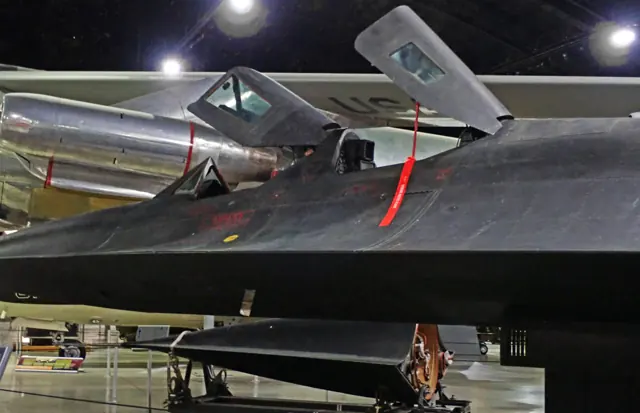
Lockheed developed the SR-71 for strategic reconnaissance at very high altitude and sustained supersonic speed. Long chines blend into the fuselage and wing; two large nacelles house the engines and carry inward-canted fins. The airframe reflects the thermal and aerodynamic demands of that mission.
Aircraft background
Wikipedia contributors · Read more ↗A few seconds of starlight stay with the pilot for decades
Among the facts and stories people asked him about, Shul most vividly remembered a brief view of the night sky. After turning off the cockpit lights, he saw the Milky Way and shooting stars with unusual clarity. He recalled being surprised that the instruments were still visible in the starlight. The beauty of that moment sat alongside work he never considered routine.
Hodinkee interview · July 2021. SR-71 recollection; other passages about A-7 and T-38 flights are separate experiences.
Hodinkee · Read more ↗Released product and variants
The current XR-71-TB is an experimental simulation inspired by the SR-71, with Mach 3 propulsion and inlet systems. The developer explicitly describes it as a research testbed rather than the operational military aircraft.
XR-71-TB testbed · VSKYLABS · X-Plane 12
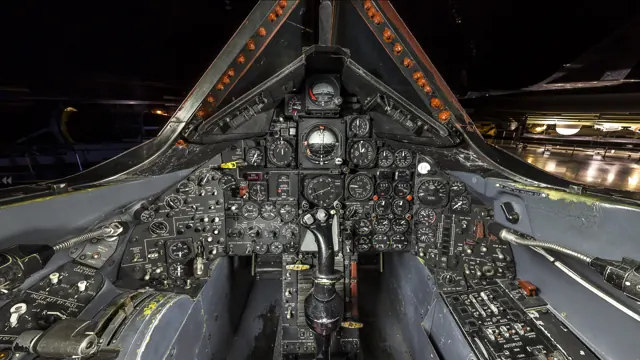
VSKYLABS · Read more ↗Into the cockpit
 YouTube
 Animagraffs · 56 min ·
How the Lockheed SR-71 Blackbird Works
An animated explanation of the SR-71, with contributions credited to museum staff and former crew.
Real aircraft · Lockheed SR-71
Watch on YouTube ↗Preview images are served by AirframeDB. Videos open on YouTube only when you choose to watch.
Meet Lockheed SR-71
Lockheed developed the SR-71 for strategic reconnaissance at very high altitude and sustained supersonic speed. Long chines blend into the fuselage and wing; two large nacelles house the engines and carry inward-canted fins. The airframe reflects the thermal and aerodynamic demands of that mission.
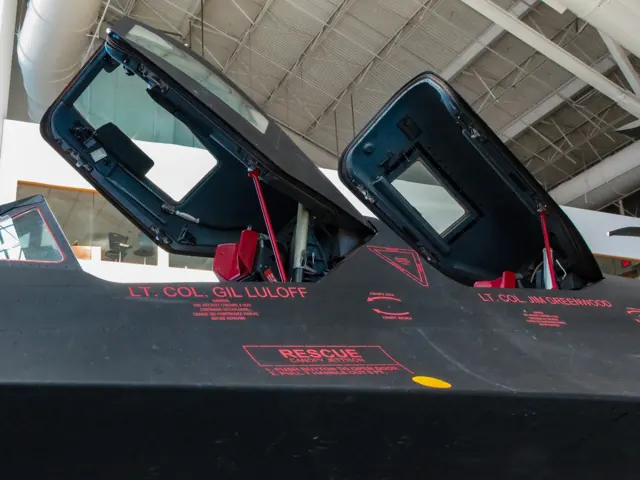
The operational SR-71A and two-seat SR-71B trainer differ visibly: the trainer has a raised rear cockpit. Simulator systems are documented for the particular model represented.
Lockheed SR-71
Aircraft type designators
A model-specific ICAO or FAA designator has not been confirmed in the references reviewed for this aircraft.
History & design
The museum aircraft had a long career before its delivery
The museum traces its Blackbird through operational flying from Kadena in 1969 and later test work at Palmdale. Its final delivery in March 1990 brought an aircraft with hundreds of earlier flights into preservation, connecting the display with a specific service history.
National Air and Space Museum · Coming in hot ↗National Air and Space Museum’s history of its own airframe
Development milestones
Designer: Lockheed Skunk Works Clarence "Kelly" Johnson (Designer)
First flight: 22 December 1964, 10:00 PST
Developed from: Lockheed A-12
Wikipedia contributors · Lockheed SR-71 Blackbird ↗Lockheed SR-71 Blackbird · family/variant named by the source · Wikipedia revision 1373387970
Pilot accounts
A few seconds of starlight stay with the pilot for decades
Among the facts and stories people asked him about, Shul most vividly remembered a brief view of the night sky. After turning off the cockpit lights, he saw the Milky Way and shooting stars with unusual clarity. He recalled being surprised that the instruments were still visible in the starlight.
The beauty of that moment sat alongside work he never considered routine. Refuelling required prolonged concentration close to another large aircraft, sometimes through cloud, turbulence or darkness. Shul described the Blackbird as an aircraft that always deserved respect, even after a pilot became experienced in it.
Hodinkee interview · July 2021. SR-71 recollection; other passages about A-7 and T-38 flights are separate experiences.
Read the full account · Hodinkee ↗An unplanned meeting opens the door to the Blackbird
Graham had admired Blackbirds flying around Okinawa but assumed that his chances of joining the programme were remote. A stop at base operations on the way to lunch changed that. The SR-71 squadron commander explained that existing crews had backgrounds much like his, encouraging him to apply for an interview and flying evaluation.
In the small squadron, getting along with colleagues mattered alongside flying qualifications. Graham later shared detachment-command duties at Mildenhall with Don Emmons, who had been his reconnaissance systems officer for seven years. Repeated tours overseas brought management work and interruptions as well as flying.
COMBATSIM.COM interview dated December 1997. SR-71 pilot and later commander; the page’s 2005 archive-creation date is separate from the interview date.
Read the full account · COMBATSIM.COM ↗A museum delivery begins with a worrying fuel indication
The flight taking the Smithsonian’s Blackbird to its new home nearly began with an abort. Yeilding recalled an unexpected fuel indication and the concern that the aircraft might not have the fuel expected in one tank. Once the problem had been dealt with, he and Joseph Vida continued east.
The delivery became a record-setting journey before ending at Washington Dulles. For Yeilding, the calm early-morning view from the cockpit had briefly given way to the work of resolving a problem in a very fast aircraft. The museum’s account connects that recollection with the aeroplane visitors now see at the Udvar-Hazy Center. It describes this airframe’s final flight, rather than the end of every SR-71 operation.
National Air and Space Museum account · March 2024, using Yeilding’s recollections of the 6 March 1990 delivery flight with reconnaissance systems officer Joseph Vida.
Read the full account · National Air and Space Museum ↗In your simulator
Systems, equipment and documentation for each developer’s aircraft.
Compare simulator versions →X-Plane 11Lockheed SR-71
Laminar Research · Released
Lockheed SR-71
Laminar Research · Released
X-Plane 12XR-71-TB testbed
VSKYLABS · Released
XR-71-TB testbed
VSKYLABS · Released
MSFS 2024SR-71A
Blackbird Simulations · Released
SR-71A
Blackbird Simulations · Released
Aircraft specifications
Published figures for the named real-aircraft variant. Simulator equipment and performance can differ.
| Specification | Published value |
|---|---|
| Length | 107 ft 5 in (32.74 m) |
| Wingspan | 55 ft 7 in (16.94 m) |
| Height | 18 ft 6 in (5.64 m) |
| Wing area | 1,800 sq ft (170 m² ) |
| Empty weight | 67,500 lb (30,617 kg) |
| Gross weight | 152,000 lb (68,946 kg) |
| Max takeoff weight | 172,000 lb (78,018 kg) |
| Powerplant | 2 × Pratt & Whitney J58 (JT11D-20J or JT11D-20K) afterburning turbojets, 25,000 lbf (110 kN) thrust each |
| Maximum speed | 1,910 kn (2,200 mph, 3,540 km/h) at 80,000 ft (24,000 m) |
| Maximum speed | Mach 3.3 |
| Service ceiling | 85,000 ft (26,000 m) |
| Rate of climb | 11,820 ft/min (60.0 m/s) |
Manuals & resources
Find your next read
Choose a topic for a short introduction and a link to the original source. Simulator references identify the developer and edition they cover.
Simulator documentation
Released product and variantsXR-71-TB testbed · VSKYLABS · X-Plane 12
The current XR-71-TB is an experimental simulation inspired by the SR-71, with Mach 3 propulsion and inlet systems. The developer explicitly describes it as a research testbed rather than the operational military aircraft.
Official developer / designated-store reference · checked 2026-09-14
VSKYLABS · Read the source ↗Pilot account
A few seconds of starlight stay with the pilot for decadesHodinkee interview · July 2021. SR-71 recollection; other passages about A-7 and T-38 flights are separate experiences.
Among the facts and stories people asked him about, Shul most vividly remembered a brief view of the night sky. After turning off the cockpit lights, he saw the Milky Way and shooting stars with unusual clarity. He recalled being surprised that the instruments were still visible in the starlight. The beauty of that moment sat alongside work he never considered routine. Refuelling required prolonged concentration close to another large aircraft, sometimes through cloud, turbulence or darkness.
Brian Shul
Hodinkee · Read the source ↗An unplanned meeting opens the door to the BlackbirdCOMBATSIM.COM interview dated December 1997. SR-71 pilot and later commander; the page’s 2005 archive-creation date is separate from the interview date.
Graham had admired Blackbirds flying around Okinawa but assumed that his chances of joining the programme were remote. A stop at base operations on the way to lunch changed that. The SR-71 squadron commander explained that existing crews had backgrounds much like his, encouraging him to apply for an interview and flying evaluation. In the small squadron, getting along with colleagues mattered alongside flying qualifications.
Richard H. Graham
COMBATSIM.COM · Read the source ↗Developer documentation
SR-71A — product listingSR-71A · MSFS 2024
Product listing captured 2026-09-23; edition scope from the reviewed catalogue
blackbirdsims.com · Read the source ↗Read the original documentation from the people who created it. Manuals open on their publisher’s website.
Manual
X-Plane 11 Desktop ManualLaminar Research X-Plane aircraft and avionics manualsLaminar ResearchAircraft background
Lockheed SR-71 BlackbirdWikipedia contributors · Research background · Wikipedia revision 1373387970 · retrieved 2026-09-12Developer documentation
VSKYLABS Test-Pilot: SR-71-TB. Mach 3 Simulation & D-21 Drone for X-Plane.VSKYLABS · Official developer / designated-store reference · checked 2026-09-14 VSKYLABS Aerospace Simulations Aircraft Center: VSKYLABS 'Test-Pilot': SR-71-TB BlackbirdVSKYLABS · Official developer / designated-store reference · checked 2026-09-14Product
SR-71A for MSFS2024 - Early Accessblackbirdsims.com · Product listing captured 2026-09-23; edition scope from the reviewed catalogueBuilt-in force-feedback profiles
Read the documentary basis, editable starting settings and remaining questions for the aircraft you fly. Each explanation refers to the exact profile revision shown.
Catalogue programme-20261022-v1 · 2 profile choices
Blackbird Simulations SR71A
Blackbird Simulations · Free and Pro · Revision 3 · Inherited starting point
MSFS 2024
Blackbird Simulations SR71A: Artificial feel motivates a fixed supported stick response.
Lockheed SR-71
Free and Pro · Revision 1 · Partial review
X-Plane 11 · X-Plane 12
Lockheed SR-71: Artificial feel motivates a fixed supported stick response.
Blackbird Simulations SR71A
Blackbird Simulations SR71A: Artificial feel motivates a fixed supported stick response.
Aircraft and simulator scope
- Blackbird Simulations SR71A · Blackbird Simulations · MSFS 2024 · Add-on starting point
The simulator model and controls
Lockheed developed the SR-71 for strategic reconnaissance at very high altitude and sustained supersonic speed. Long chines blend into the fuselage and wing; two large nacelles house the engines and carry inward-canted fins. The airframe reflects the thermal and aerodynamic demands of that mission.
This profile selects Blackbird Simulations SR71A for MSFS 2024.
How this profile feels
Artificial feel motivates a fixed supported stick response. The spring stays independent of airspeed. A separate aerodynamic term adds speed-dependent control load.
Downstream trim actuators change surfaces without moving stick neutral. Pitch-trim relief is off. Autopilot following is off.
Controls and trim
The SR-71’s irreversible hydraulic controls use artificial feel. Its pitch/roll trim actuators are downstream of the feel springs and do not displace the stick. The high-speed reconnaissance configuration therefore separates surface trim from inceptor centering.
The selected implementation
The SR-71 manual describes irreversible hydraulic controls and artificial feel. Pitch and roll trim actuators sit downstream of the feel springs and do not displace the stick.
About the values
The gains are normalized profile settings. They describe the chosen effect balance; hand force depends on the device and its output limits. IAS references are tuning values rather than operating limits. Physical acceptance of this revision remains pending.
Documentary review and sources
These decisions describe the documentary basis and remaining gaps for this revision. Aircraft documentation and a starting setting describe different kinds of evidence.
Aircraft and variant
InheritedThis profile selects Blackbird Simulations SR71A for MSFS 2024.
Flight controls
InheritedThe SR-71’s irreversible hydraulic controls use artificial feel. Its pitch/roll trim actuators are downstream of the feel springs and do not displace the stick. The high-speed reconnaissance configuration therefore separates surface trim from inceptor centering.
Trim
InheritedDownstream trim actuators change surfaces without moving stick neutral. Pitch relief is off, with stored authority 0; roll authority is 0.
Autopilot and stability
InheritedAutopilot following is off; the configured spring and load retain the hardware feel.
Equipment
InheritedThe SR-71 manual describes irreversible hydraulic controls and artificial feel. Pitch and roll trim actuators sit downstream of the feel springs and do not displace the stick.
Speeds and limits
InheritedThe indicated-speed references set the profile response scale; they are separate from aircraft operating limits.
Simulator integration
InheritedThe profile targets msfs2024. Add-on-specific controls use only the supported references configured by this profile.
Force-feedback settings
InheritedThe settings define the profile’s effect balance. Device output limits affect physical hand force.
Starting settings and their rationale
These configured values are starting estimates. The explanations describe what each setting controls; physical validation appears separately below.
| Setting | Starting value | What it controls and why |
|---|---|---|
| Spring strength | Starting value0.74 | What it controls and whyArtificial feel motivates a fixed supported stick response. The baseline spring is 0.74. Low-speed spring blending is off. |
| Master force gain | Starting value0.85 | What it controls and whyScales overall profile strength while preserving effect balance, subject to device and output limits. |
| Profile force gain | Starting value0.25 | What it controls and whyThe aerodynamic-load gain is 0.25 with an indicated-speed reference of 300 KIAS. The hydraulic-load factor of 0.35 scales that modeled term; it is a selected artificial-feel approximation. |
| Force tuning speed/reference | Starting value300 kt | What it controls and whySets the IAS reference for aerodynamic loading. It is an estimate, not published cruise TAS or a flight limit. |
| Spring response reference speed | Starting value65 kt | What it controls and whySets the IAS where the low-speed blend reaches baseline strength; high-speed stiffening also uses it. |
| Aileron force scale | Starting value0.72 | What it controls and whyRoll and pitch aerodynamic scales are 0.72 and 1, respectively. They set the aerodynamic axis balance. No custom spring-travel curve is enabled. |
| Elevator force scale | Starting value1 | What it controls and whyScales pitch aerodynamic loading; pitch spring travel and trim responses are separate settings. |
| Trim feel | Starting valueDisabled | What it controls and whyRetained for compatibility and group membership. Trim relief, rather than this flag, controls centre movement. |
| Trim relief | Starting valueDisabled | What it controls and whyAllows trim relief with supported control law and valid telemetry. Axis authorities set its amount. |
| Autopilot follow | Starting valueDisabled | What it controls and whyAutopilot following is off; the configured spring and load retain the hardware feel. |
| Autopilot neutral hold | Starting valueDisabled | What it controls and whyPermits centering hold during a supported AP state, separate from following a moving target. |
| Output force limit | Starting value0.55 | What it controls and whyCaps directed-force output. Native spring effects and device limits remain separate. |
All 44 starting settings and their rationale
The settings define the profile’s effect balance. Device output limits affect physical hand force.
| Setting | Starting value | What it controls and why |
|---|---|---|
| Spring strength | Starting value0.74 | What it controls and whyArtificial feel motivates a fixed supported stick response. The baseline spring is 0.74. Low-speed spring blending is off. |
| Spring deadband | Starting value0.04 | What it controls and whySets travel around the centre before the baseline spring resists. Smaller values engage it sooner. |
| Profile force gain | Starting value0.25 | What it controls and whyThe aerodynamic-load gain is 0.25 with an indicated-speed reference of 300 KIAS. The hydraulic-load factor of 0.35 scales that modeled term; it is a selected artificial-feel approximation. |
| Master force gain | Starting value0.85 | What it controls and whyScales overall profile strength while preserving effect balance, subject to device and output limits. |
| QBlend Enabled | Starting valueDisabled | What it controls and whyAllows baseline spring strength to rise with indicated airspeed where the control law permits it. |
| QSpring Minimum Factor | Starting value0.55 | What it controls and whySets low-speed spring strength as a fraction of baseline when blending is enabled. One keeps full strength. |
| QSpring Start Knots | Starting value8 kt | What it controls and whySets the IAS where the low-speed spring blend starts rising. This is a feel threshold, not a flight limit. |
| Spring response reference speed | Starting value65 kt | What it controls and whySets the IAS where the low-speed blend reaches baseline strength; high-speed stiffening also uses it. |
| Force tuning speed/reference | Starting value300 kt | What it controls and whySets the IAS reference for aerodynamic loading. It is an estimate, not published cruise TAS or a flight limit. |
| Airspeed spring stiffening gain | Starting value0 | What it controls and whyThe high-speed spring-stiffening gain is 0. No additional speed-driven stiffening is added; this does not disable independent aerodynamic loading. |
| Airspeed spring stiffening limit | Starting value5 | What it controls and whyLimits the squared airspeed ratio used for high-speed spring stiffening; it is not a device-force cap. |
| Aileron force scale | Starting value0.72 | What it controls and whyRoll and pitch aerodynamic scales are 0.72 and 1, respectively. They set the aerodynamic axis balance. No custom spring-travel curve is enabled. |
| Elevator force scale | Starting value1 | What it controls and whyScales pitch aerodynamic loading; pitch spring travel and trim responses are separate settings. |
| Output force limit | Starting value0.55 | What it controls and whyCaps directed-force output. Native spring effects and device limits remain separate. |
| Trim feel | Starting valueDisabled | What it controls and whyRetained for compatibility and group membership. Trim relief, rather than this flag, controls centre movement. |
| Trim relief | Starting valueDisabled | What it controls and whyAllows trim relief with supported control law and valid telemetry. Axis authorities set its amount. |
| Elevator Authority | Starting value0 | What it controls and whyDownstream trim actuators change surfaces without moving stick neutral. Pitch relief is off, with stored authority 0; roll authority is 0. |
| Aileron Authority | Starting value0 | What it controls and whyScales supported roll-trim relief and permitted centre movement. Zero removes roll response. |
| Force Trim Enabled | Starting valueDisabled | What it controls and whyEnables local force trim, separate from aircraft-owned trim and add-on integration qualification. |
| GLoad Enabled | Starting valueEnabled | What it controls and whyAllows load-factor changes to modify permitted spring laws. Passive fly-by-wire feel can suppress it. |
| Rate Damping Enabled | Starting valueEnabled | What it controls and whyEnables rate damping with the configured coefficients and control law. |
| Autopilot follow | Starting valueDisabled | What it controls and whyAutopilot following is off; the configured spring and load retain the hardware feel. |
| Autopilot follow authority | Starting value0.1 | What it controls and whySets admitted AP-follow gain, not a percentage of travel. Runtime ownership and input limits still apply. |
| Autopilot neutral hold | Starting valueDisabled | What it controls and whyPermits centering hold during a supported AP state, separate from following a moving target. |
| Autopilot neutral hold strength | Starting value0.6 | What it controls and whySets admitted AP neutral-hold strength; inactive while neutral hold is disabled. |
| Enabled | Starting valueEnabled | What it controls and whyEnables aerodynamic cues; each still needs nonzero strength and its simulator conditions. |
| Gain | Starting value0 | What it controls and whySets stall-buffet strength. Zero removes the cue without changing simulator stalls or warnings. |
| Gain | Starting value0 | What it controls and whySets high-Mach buffet strength; onset and full-strength thresholds are separate. |
| Gain | Starting value0 | What it controls and whySets flap buffet at the configured position and speed gates. Flap movement texture is separate. |
| Maximum flap index | Starting value3 | What it controls and whySets the final flap index for detent normalization. UP plus three detents uses maximum index3. |
| Minimum flap index | Starting value2 | What it controls and whySets the first flap detent that admits buffet; this is a handle index, not degrees. |
| Gain | Starting value0 | What it controls and whySets gear aerodynamic buffet; movement and ground-contact cues are separate. |
| Shaker Enabled | Starting valueDisabled | What it controls and whyPermits shaker at supported warning conditions; the switch does not establish aircraft equipment. |
| Stick shaker amplitude | Starting value0.5 | What it controls and whySets triggered shaker strength; inactive while the shaker feature is disabled. |
| Enabled | Starting valueEnabled | What it controls and whyEnables ground effects; each still needs its own strength and contact or motion telemetry. |
| Gain | Starting value0.4 | What it controls and whySets rolling texture strength, modified by speed, surface and undercarriage configuration. |
| Gain | Starting value0.25 | What it controls and whySets gear-bump texture during ground motion, separate from touchdown impact. |
| Gain | Starting value0.65 | What it controls and whySets landing-impact strength; landing telemetry and response shape determine the pulse. |
| Gain | Starting value0 | What it controls and whySets reverse-thrust vibration with valid reverser and engine conditions. Zero removes the cue. |
| Enabled | Starting valueDisabled | What it controls and whyEnables engine cues with nonzero settings and valid running-engine telemetry. |
| Gain | Starting value0 | What it controls and whySets estimated engine vibration using configured telemetry and response, not measured cockpit vibration. |
| Enabled | Starting valueEnabled | What it controls and whyEnables accessory cues with configured strengths and observed accessory movement. |
| Gain | Starting value0 | What it controls and whySets texture from observed flap movement; a command without movement does not establish the cue. |
| Gain | Starting value0.025 | What it controls and whySets texture from observed gear movement, separate from aerodynamic and touchdown effects. |
Limits and open questions
- Irreversible hydraulic elevons with spring feel. Estimated lighter lateral gradient, no dynamic-pressure surface backdrive. Real asymmetric travel/loads are not reproduced by a symmetric commodity base.
- Pitch and roll trim operate downstream of the feel springs; neither changes stick neutral. All trim-neutral and input-compensation paths disabled.
- AFCS/CSC/SAS remain aircraft-owned. No qualified inceptor demand; follow/hold disabled, including during known early-access navigation issues.
- Blackbird0.8.98 native2024 early access; published circuit-breaker, temperature and autoflight limitations are retained. Surface limiters and shaker/pusher require explicit validated output telemetry before hardware actuation.
- 300 KIAS is an estimated control-feel reference, not cruise TAS, V-speeds or an operating limit.
- Spring 0.74, lateral scale 0.45, trim relief 0/0; editable estimates, not measured hand forces.
- Physical and installed-aircraft checks are deferred. Save this profile as the aircraft default if telemetry omits its developer or configuration.
- Only actual accessory-position changes drive movement textures. No pressure-dependent failures, guessed servo outputs or input compensation.
Physical validation
No physical force validation is recorded in this public catalogue for this revision. Documentary review and software checks do not establish how a particular device feels.
Discuss this aircraft (0)
Questions, observations and useful sources from the community.
No published discussions yet. Bring a question or share a useful source.
Open aircraft discussions →Content expanded · What’s new
Something missing or a source that needs attention?
Suggest a correction ↗