



Start here
A few places to begin, from the aircraft’s story to the people who fly it.
Meet the aircraft
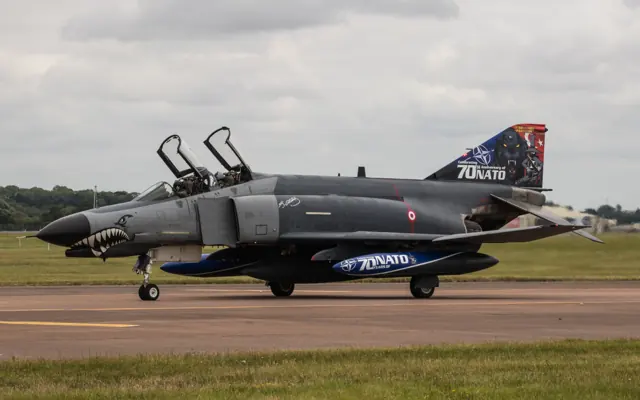
The Phantom began as a US Navy aircraft and was adopted by the US Air Force, Marine Corps and export customers. Large intakes, upward-angled outer wing panels and downward-angled tailplanes distinguish its airframe.
Aircraft background
Wikipedia contributors · Read more ↗Moving from the Hunter into a two-person working cockpit
Bolton’s move from the Hunter to the Phantom meant learning an aircraft with a very different size and reputation. The initial impression of a large, powerful machine gradually gave way to understanding what it did well. The second crew member and the radar became central parts of that experience. His work also changed when he moved from RAF ground-attack flying to the Royal Navy’s fleet-defence role.
Hush-Kit interview · July 2017. British Phantom service, including Royal Navy FG.1 flying with 892 Squadron from late 1973.
Hush-Kit · Read more ↗The Phantom helped drive changes to the core flight model
Austin Meyer’s February 2022 development account describes revising both X-Plane’s aerodynamic model and the F-4 aircraft definition with feedback from a former Phantom instructor. It specifically discusses changing the earlier artificial-stability arrangement while retaining damping.
McDonnell Douglas F-4 Phantom II · Laminar Research · X-Plane 12
Laminar Research Developer · Read more ↗Into the cockpit
 YouTube
 Military Aviation History · 22 min ·
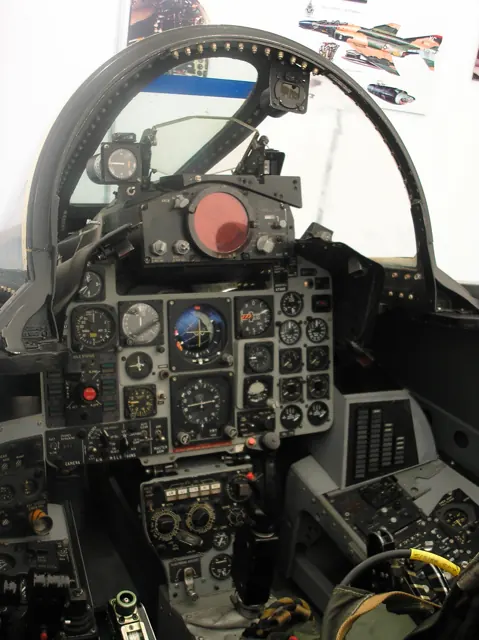
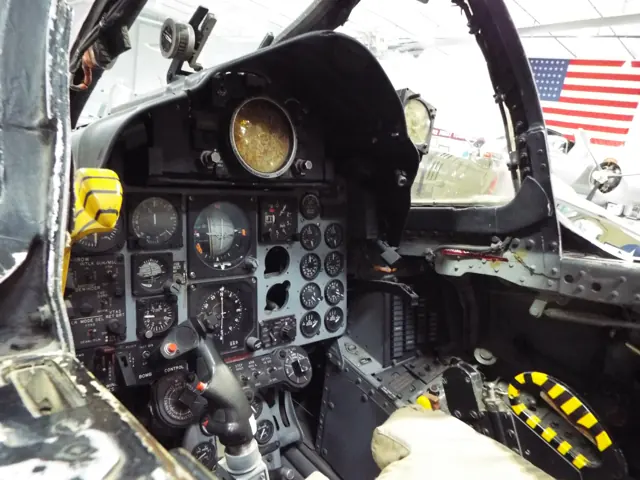
Inside The Cockpit: F-4 Phantom II FGR.2
A museum cockpit tour of the British FGR.2 Phantom variant.
Real aircraft · British F-4 FGR.2
Watch on YouTube ↗Preview images are served by AirframeDB. Videos open on YouTube only when you choose to watch.
Meet McDonnell Douglas F-4 Phantom II
The Phantom began as a US Navy aircraft and was adopted by the US Air Force, Marine Corps and export customers. Large intakes, upward-angled outer wing panels and downward-angled tailplanes distinguish its airframe.
Interceptor, strike and reconnaissance versions carried different engines, radar and cockpit equipment. National upgrades added further differences during the type's long service.
McDonnell Douglas F-4 Phantom II
McDonnell Douglas → · Explore the family →
McDonnell Douglas F-4 Phantom II
Wikipedia contributors · McDonnell Douglas F-4 Phantom II ↗Laminar Research · X-Plane 12 →Laminar Research · X-Plane 11 →Aircraft type designators
Use the code for the model you are flying. The linked authority lists the applicable aircraft.
History & design
The Phantom’s U.S. Air Force farewell includes its civilian instructors
Harkins’s interview places the final U.S. Air Force QF-4 flights at Holloman on 21 December 2016. His nine years as a civilian instructor illustrate the human contribution behind the aircraft’s late target-support career.
Avgeekery · Meet the last U.S. Air Force F-4 pilot ↗Interview published nine days after the farewell
Development milestones
First flight: 27 May 1958 ( 1958-05-27 )
Wikipedia contributors · McDonnell Douglas F-4 Phantom II ↗McDonnell Douglas F-4 Phantom II · family/variant named by the source · Wikipedia revision 1373929760
Pilot accounts
Moving from the Hunter into a two-person working cockpit
Bolton’s move from the Hunter to the Phantom meant learning an aircraft with a very different size and reputation. The initial impression of a large, powerful machine gradually gave way to understanding what it did well. The second crew member and the radar became central parts of that experience.
His work also changed when he moved from RAF ground-attack flying to the Royal Navy’s fleet-defence role. Shipboard preparation and practice brought their own audience and pressures, with other people watching how the crew performed. In his recollection, learning the Phantom was therefore more than mastering another set of controls. It involved a working partnership in the cockpit and adapting familiar flying skills to a different service environment.
Hush-Kit interview · July 2017. British Phantom service, including Royal Navy FG.1 flying with 892 Squadron from late 1973.
Read the full account · Hush-Kit ↗Forty-five minutes of smiling at the end of a second career
Harkins had not expected to spend the later part of his career flying a fighter designed in the 1950s. Working as a civilian instructor gave him nine years and more than a thousand hours in the Phantom. By the farewell flights at Holloman, it had become a substantial second chapter in his flying life.
He remembered smiling so much during the final forty-five-minute flight that his cheeks hurt. The farewell appearances also brought conversations with veterans, families and old friends who wanted to see the aircraft again. Harkins compared his part in those events to driving the bus for the real star.
Avgeekery interview · December 2016. Civilian QF-4 instructor recalling the final U.S. Air Force Phantom flights at Holloman on 21 December; not the last F-4 flight worldwide.
Read the full account · Avgeekery ↗Choosing the front seat and learning from returning crews
Rubus had initially hoped for an F-105 assignment, but the available choices led him towards the Phantom. The opportunity to train for its front seat appealed to him, even when others warned that a new second lieutenant might find himself assigned to the rear cockpit instead. Looking back, he regarded the decision as a good one.
At George Air Force Base, instructors who had already served in Southeast Asia helped prepare him for the environment he would enter. Arriving at Ubon brought the classroom and conversion work into a different setting, with learning and staying alive closely connected in his recollection.
Dartmouth Vietnam Project oral-history transcript · January 2016. F-4 training at George AFB before a first Ubon tour from February 1969 to December 1970.
Read the full account · Dartmouth Vietnam Project ↗In your simulator
Systems, equipment and documentation for each developer’s aircraft.
Compare simulator versions →X-Plane 12McDonnell Douglas F-4 Phantom II
Laminar Research · Released
McDonnell Douglas F-4 Phantom II
Laminar Research · Released
X-Plane 11McDonnell Douglas F-4
Laminar Research · Released
McDonnell Douglas F-4
Laminar Research · Released
MSFS 2020 · MSFS 2024F-4E, F-4J and FGR2 Phantom
DC Designs · Released
F-4E, F-4J and FGR2 Phantom
DC Designs · Released
Aircraft specifications
Published figures for the named real-aircraft variant. Simulator equipment and performance can differ.
| Specification | Published value |
|---|---|
| Length | 63 ft 0 in (19.2 m) |
| Wingspan | 38 ft 5 in (11.7 m) |
| Height | 16 ft 5 in (5 m) |
| Wing area | 530 sq ft (49.2 m² ) |
| Empty weight | 30,328 lb (13,757 kg) |
| Gross weight | 41,500 lb (18,824 kg) |
| Max takeoff weight | 61,795 lb (28,030 kg) |
| Powerplant | 2 × General Electric J79-GE-17A after-burning turbojet engines, 11,905 lbf (52.96 kN) thrust each dry, 17,845 lbf (79.38 kN) with afterburner |
| Maximum speed | 1,280 kn (1,470 mph, 2,370 km/h) at 40,000 ft (12,000 m) |
| Maximum speed | Mach 2.23 |
| Cruise speed | 510 kn (580 mph, 940 km/h) |
| Service ceiling | 60,000 ft (18,000 m) |
| Rate of climb | 41,300 ft/min (210 m/s) |
Manuals & resources
Find your next read
Choose a topic for a short introduction and a link to the original source. Simulator references identify the developer and edition they cover.
Simulator documentation
The Phantom helped drive changes to the core flight modelMcDonnell Douglas F-4 Phantom II · Laminar Research · X-Plane 12
Austin Meyer’s February 2022 development account describes revising both X-Plane’s aerodynamic model and the F-4 aircraft definition with feedback from a former Phantom instructor. It specifically discusses changing the earlier artificial-stability arrangement while retaining damping.
X-Plane 12 development report; attributed design history, not present runtime qualification
Laminar Research Developer · Read the source ↗Transonic pitch behaviour was part of that development workMcDonnell Douglas F-4 Phantom II · Laminar Research · X-Plane 12
The same report discusses changes to the simulated centre of pressure and the resulting pitch response through the transonic region. The developer describes these priorities for the X-Plane 12 version; no independent fidelity assessment is supplied.
Laminar Research Developer · February 2022; earlier simulator editions are not assigned these changes
Laminar Research Developer · Read the source ↗Pilot account
Moving from the Hunter into a two-person working cockpitHush-Kit interview · July 2017. British Phantom service, including Royal Navy FG.1 flying with 892 Squadron from late 1973.
Bolton’s move from the Hunter to the Phantom meant learning an aircraft with a very different size and reputation. The initial impression of a large, powerful machine gradually gave way to understanding what it did well. The second crew member and the radar became central parts of that experience. His work also changed when he moved from RAF ground-attack flying to the Royal Navy’s fleet-defence role.
Chris Bolton
Hush-Kit · Read the source ↗Forty-five minutes of smiling at the end of a second careerAvgeekery interview · December 2016. Civilian QF-4 instructor recalling the final U.S. Air Force Phantom flights at Holloman on 21 December; not the last F-4 flight worldwide.
Harkins had not expected to spend the later part of his career flying a fighter designed in the 1950s. Working as a civilian instructor gave him nine years and more than a thousand hours in the Phantom. By the farewell flights at Holloman, it had become a substantial second chapter in his flying life. He remembered smiling so much during the final forty-five-minute flight that his cheeks hurt.
Jim “WAM” Harkins
Avgeekery · Read the source ↗Read the original documentation from the people who created it. Manuals open on their publisher’s website.
Manual
X-Plane 12 Desktop ManualLaminar Research X-Plane aircraft and avionics manualsLaminar Research X-Plane 11 Desktop ManualLaminar ResearchAircraft background
McDonnell Douglas F-4 Phantom IIWikipedia contributors · Research background · Wikipedia revision 1373929760 · retrieved 2026-09-12Developer documentation
X-Plane 12 flight model update: supersonic transition, delta wings and mass propertiesLaminar Research Developer · Austin Meyer · February 2022 DC Designs F-4E, F-4J and FGR2 PhantomDC Designs / Just Flight · Product listing captured 28 September 2026; MSFS 2020 and 2024Type designator
ICAO Doc 8643 — aircraft type designatorsInternational Civil Aviation Organization · Public search data retrieved 2026-09-14; authority update 2026-09-03Built-in force-feedback profiles
Read the documentary basis, editable starting settings and remaining questions for the aircraft you fly. Each explanation refers to the exact profile revision shown.
Catalogue programme-20261022-v1 · 2 profile choices
DC Designs F-4E / F-4J / FGR2 Phantom
DC Designs · Free and Pro · Revision 2 · Inherited starting point
MSFS 2020 · MSFS 2024
DC Designs F-4E / F-4J / FGR2 Phantom: Hydraulic control assistance motivates artificial stick centering.
McDonnell Douglas F-4 Phantom II
Free and Pro · Revision 1 · Partial review
X-Plane 12 · X-Plane 11
McDonnell Douglas F-4 Phantom II: Hydraulic control assistance motivates artificial stick centering.
McDonnell Douglas F-4 Phantom II
McDonnell Douglas F-4 Phantom II: Hydraulic control assistance motivates artificial stick centering.
Aircraft and simulator scope
- McDonnell Douglas F-4 Phantom II · X-Plane 12 · family starting point
- McDonnell Douglas F-4 Phantom II · X-Plane 11 · family starting point
McDonnell Douglas F-4 Phantom II · The 2022 Laminar developer article describes F-4 flight-model development in X-Plane 12; exact Phantom subtype is not established.
The simulator model and controls
The Phantom began as a US Navy aircraft and was adopted by the US Air Force, Marine Corps and export customers. Large intakes, upward-angled outer wing panels and downward-angled tailplanes distinguish its airframe.
This starting point selects McDonnell Douglas F-4 Phantom II. Its aircraft-level settings do not select a particular developer’s custom systems.
How this profile feels
Hydraulic control assistance motivates artificial stick centering. Spring resistance builds with the selected airspeed response. A separate aerodynamic term adds speed-dependent control load.
Pitch trim and pitch/bank hold serve separate cockpit functions. Valid trim provides the configured pressure relief. Autopilot following is off.
Controls and trim
The F-4 package includes E, J and FGR2 aircraft, a hydraulic control system and a pitch/bank-hold automatic-flight installation. Those variant and automatic-flight functions define the documented rendition.
About the values
The gains are normalized profile settings. They describe the chosen effect balance; hand force depends on the device and its output limits. IAS references are tuning values rather than operating limits. Physical acceptance of this revision remains pending.
What the documentation establishes
The 2022 Laminar developer article describes F-4 flight-model development in X-Plane 12; exact Phantom subtype is not established.
Flap downwash and spoilers/speedbrakes are discussed as simulator aerodynamic surfaces; exact detents and gear configuration are not supplied.
The developer describes transonic pitch changes and loss of spoiler effectiveness at high angle of attack. These support qualitative aerodynamic context, not a measured hand-force or buffet amplitude.
Documentary review and sources
These decisions describe the documentary basis and remaining gaps for this revision. Aircraft documentation and a starting setting describe different kinds of evidence.
Aircraft and variant
ReviewedThis starting point selects McDonnell Douglas F-4 Phantom II. Its aircraft-level settings do not select a particular developer’s custom systems.
Flight controls
Not yet reviewedThe F-4 package includes E, J and FGR2 aircraft, a hydraulic control system and a pitch/bank-hold automatic-flight installation. Those variant and automatic-flight functions define the documented rendition.
Trim
Not yet reviewedPitch trim and pitch/bank hold serve separate cockpit functions. Pitch authority 0.3 relieves permitted loading; hydraulic centre movement is off. Roll authority is 0.09.
Autopilot and stability
Not yet reviewedAutopilot following is off; the configured spring and load retain the hardware feel.
Equipment
ReviewedGear, flap and ground cues follow the selected settings and available simulator-reported states.
Speeds and limits
Not yet reviewedThe indicated-speed references set the profile response scale; they are separate from aircraft operating limits.
Simulator integration
Not yet reviewedThe profile targets xplane12, xplane11. Add-on-specific controls use only the supported references configured by this profile.
Force-feedback settings
ReviewedThe settings define the profile’s effect balance. Device output limits affect physical hand force.
Starting settings and their rationale
These configured values are starting estimates. The explanations describe what each setting controls; physical validation appears separately below.
| Setting | Starting value | What it controls and why |
|---|---|---|
| Spring strength | Starting value0.8 | What it controls and whyHydraulic control assistance motivates artificial stick centering. The baseline spring is 0.8. Its low-speed blend reaches baseline strength at 90 KIAS. |
| Master force gain | Starting value0.85 | What it controls and whyScales overall profile strength while preserving effect balance, subject to device and output limits. |
| Profile force gain | Starting value0.25 | What it controls and whyThe aerodynamic-load gain is 0.25 with an indicated-speed reference of 300 KIAS. The hydraulic-load factor of 0.35 scales that modeled term; it is a selected artificial-feel approximation. |
| Force tuning speed/reference | Starting value300.0 kt | What it controls and whySets the IAS reference for aerodynamic loading. It is an estimate, not published cruise TAS or a flight limit. |
| Spring response reference speed | Starting value90 kt | What it controls and whySets the IAS where the low-speed blend reaches baseline strength; high-speed stiffening also uses it. |
| Aileron force scale | Starting value0.65 | What it controls and whyRoll and pitch aerodynamic scales are 0.65 and 0.65, respectively. They set the aerodynamic axis balance. No custom spring-travel curve is enabled. |
| Elevator force scale | Starting value0.65 | What it controls and whyScales pitch aerodynamic loading; pitch spring travel and trim responses are separate settings. |
| Trim feel | Starting valueEnabled | What it controls and whyRetained for compatibility and group membership. Trim relief, rather than this flag, controls centre movement. |
| Trim relief | Starting valueEnabled | What it controls and whyAllows trim relief with supported control law and valid telemetry. Axis authorities set its amount. |
| Autopilot follow | Starting valueDisabled | What it controls and whyAutopilot following is off; the configured spring and load retain the hardware feel. |
| Autopilot neutral hold | Starting valueDisabled | What it controls and whyPermits centering hold during a supported AP state, separate from following a moving target. |
| Output force limit | Starting value0.55 | What it controls and whyCaps directed-force output. Native spring effects and device limits remain separate. |
All 44 starting settings and their rationale
The settings define the profile’s effect balance. Device output limits affect physical hand force.
| Setting | Starting value | What it controls and why |
|---|---|---|
| Spring strength | Starting value0.8 | What it controls and whyHydraulic control assistance motivates artificial stick centering. The baseline spring is 0.8. Its low-speed blend reaches baseline strength at 90 KIAS. |
| Spring deadband | Starting value0.035 | What it controls and whySets travel around the centre before the baseline spring resists. Smaller values engage it sooner. |
| Profile force gain | Starting value0.25 | What it controls and whyThe aerodynamic-load gain is 0.25 with an indicated-speed reference of 300 KIAS. The hydraulic-load factor of 0.35 scales that modeled term; it is a selected artificial-feel approximation. |
| Master force gain | Starting value0.85 | What it controls and whyScales overall profile strength while preserving effect balance, subject to device and output limits. |
| QBlend Enabled | Starting valueEnabled | What it controls and whyAllows baseline spring strength to rise with indicated airspeed where the control law permits it. |
| QSpring Minimum Factor | Starting value0.55 | What it controls and whySets low-speed spring strength as a fraction of baseline when blending is enabled. One keeps full strength. |
| QSpring Start Knots | Starting value20 kt | What it controls and whySets the IAS where the low-speed spring blend starts rising. This is a feel threshold, not a flight limit. |
| Spring response reference speed | Starting value90 kt | What it controls and whySets the IAS where the low-speed blend reaches baseline strength; high-speed stiffening also uses it. |
| Force tuning speed/reference | Starting value300.0 kt | What it controls and whySets the IAS reference for aerodynamic loading. It is an estimate, not published cruise TAS or a flight limit. |
| Airspeed spring stiffening gain | Starting value0 | What it controls and whyThe high-speed spring-stiffening gain is 0. No additional speed-driven stiffening is added; this does not disable independent aerodynamic loading. |
| Airspeed spring stiffening limit | Starting value5 | What it controls and whyLimits the squared airspeed ratio used for high-speed spring stiffening; it is not a device-force cap. |
| Aileron force scale | Starting value0.65 | What it controls and whyRoll and pitch aerodynamic scales are 0.65 and 0.65, respectively. They set the aerodynamic axis balance. No custom spring-travel curve is enabled. |
| Elevator force scale | Starting value0.65 | What it controls and whyScales pitch aerodynamic loading; pitch spring travel and trim responses are separate settings. |
| Output force limit | Starting value0.55 | What it controls and whyCaps directed-force output. Native spring effects and device limits remain separate. |
| Trim feel | Starting valueEnabled | What it controls and whyRetained for compatibility and group membership. Trim relief, rather than this flag, controls centre movement. |
| Trim relief | Starting valueEnabled | What it controls and whyAllows trim relief with supported control law and valid telemetry. Axis authorities set its amount. |
| Elevator Authority | Starting value0.3 | What it controls and whyPitch trim and pitch/bank hold serve separate cockpit functions. Pitch authority 0.3 relieves permitted loading; hydraulic centre movement is off. Roll authority is 0.09. |
| Aileron Authority | Starting value0.09 | What it controls and whyScales supported roll-trim relief and permitted centre movement. Zero removes roll response. |
| Force Trim Enabled | Starting valueDisabled | What it controls and whyEnables local force trim, separate from aircraft-owned trim and add-on integration qualification. |
| GLoad Enabled | Starting valueEnabled | What it controls and whyAllows load-factor changes to modify permitted spring laws. Passive fly-by-wire feel can suppress it. |
| Rate Damping Enabled | Starting valueEnabled | What it controls and whyEnables rate damping with the configured coefficients and control law. |
| Autopilot follow | Starting valueDisabled | What it controls and whyAutopilot following is off; the configured spring and load retain the hardware feel. |
| Autopilot follow authority | Starting value0.1 | What it controls and whySets admitted AP-follow gain, not a percentage of travel. Runtime ownership and input limits still apply. |
| Autopilot neutral hold | Starting valueDisabled | What it controls and whyPermits centering hold during a supported AP state, separate from following a moving target. |
| Autopilot neutral hold strength | Starting value0.6 | What it controls and whySets admitted AP neutral-hold strength; inactive while neutral hold is disabled. |
| Enabled | Starting valueEnabled | What it controls and whyEnables aerodynamic cues; each still needs nonzero strength and its simulator conditions. |
| Gain | Starting value0.3 | What it controls and whySets stall-buffet strength. Zero removes the cue without changing simulator stalls or warnings. |
| Gain | Starting value0 | What it controls and whySets high-Mach buffet strength; onset and full-strength thresholds are separate. |
| Gain | Starting value0.14 | What it controls and whySets flap buffet at the configured position and speed gates. Flap movement texture is separate. |
| Maximum flap index | Starting value2 | What it controls and whySets the final flap index for detent normalization. UP plus three detents uses maximum index3. |
| Minimum flap index | Starting value2 | What it controls and whySets the first flap detent that admits buffet; this is a handle index, not degrees. |
| Gain | Starting value0.1 | What it controls and whySets gear aerodynamic buffet; movement and ground-contact cues are separate. |
| Shaker Enabled | Starting valueEnabled | What it controls and whyPermits shaker at supported warning conditions; the switch does not establish aircraft equipment. |
| Stick shaker amplitude | Starting value0.9 | What it controls and whySets triggered shaker strength; inactive while the shaker feature is disabled. |
| Enabled | Starting valueEnabled | What it controls and whyEnables ground effects; each still needs its own strength and contact or motion telemetry. |
| Gain | Starting value0.4 | What it controls and whySets rolling texture strength, modified by speed, surface and undercarriage configuration. |
| Gain | Starting value0.32 | What it controls and whySets gear-bump texture during ground motion, separate from touchdown impact. |
| Gain | Starting value0.9 | What it controls and whySets landing-impact strength; landing telemetry and response shape determine the pulse. |
| Gain | Starting value0.5 | What it controls and whySets reverse-thrust vibration with valid reverser and engine conditions. Zero removes the cue. |
| Enabled | Starting valueEnabled | What it controls and whyEnables engine cues with nonzero settings and valid running-engine telemetry. |
| Gain | Starting value0.06 | What it controls and whySets estimated engine vibration using configured telemetry and response, not measured cockpit vibration. |
| Enabled | Starting valueEnabled | What it controls and whyEnables accessory cues with configured strengths and observed accessory movement. |
| Gain | Starting value0.12 | What it controls and whySets texture from observed flap movement; a command without movement does not establish the cue. |
| Gain | Starting value0.12 | What it controls and whySets texture from observed gear movement, separate from aerodynamic and touchdown effects. |
Limits and open questions
- The article's aerodynamic development and rate-damper description do not substantiate hydraulic control gearing or the assigned artificial-feel mechanism.
- Trim mechanism and force relief are not described.
- A rate damper is described, but an installed autopilot or external servo-following behavior is not established.
- Illustrative speed-envelope and transonic discussion do not provide a subtype-specific IAS schedule or justify the 300-knot force reference.
- A native flight-model implementation without plugins does not define external control or force-feedback status signals.
- McDonnell Douglas F-4 Phantom II documentary evidence does not establish force-feedback hardware acceptance.
Physical validation
No physical force validation is recorded in this public catalogue for this revision. Documentary review and software checks do not establish how a particular device feels.
Discuss this aircraft (0)
Questions, observations and useful sources from the community.
No published discussions yet. Bring a question or share a useful source.
Open aircraft discussions →Content expanded · What’s new
Something missing or a source that needs attention?
Suggest a correction ↗


