Find aircraft background, systems descriptions and manuals for the aircraft you are researching. Each note keeps its source and version context close by.
Simulator manuals describe the developer’s implementation. Aircraft background is research-based; pilot accounts describe an individual’s experience. Coverage here is limited to the selected notes and linked resources, not the full contents of every manual.
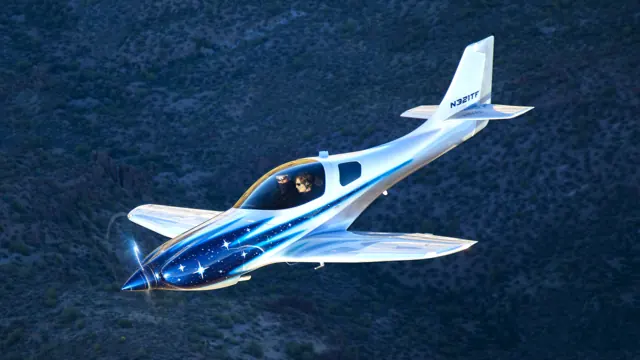
Lancair Legacy · Aerobask · X-Plane 12
A retractable Legacy with its own avionics suite
Aerobask’s XP12 Legacy RG represents a 310 hp IO-550 aircraft with an Avidyne EXP5000 display and DFC90 autopilot. Its documented instruments also include a VM1000C engine monitor, oxygen controller, angle-of-attack display and MD302 standby unit. This cockpit uses Avidyne equipment, unlike Aerobask's G1000 installations in other aircraft.
Gathered Aerobask Legacy RG product page
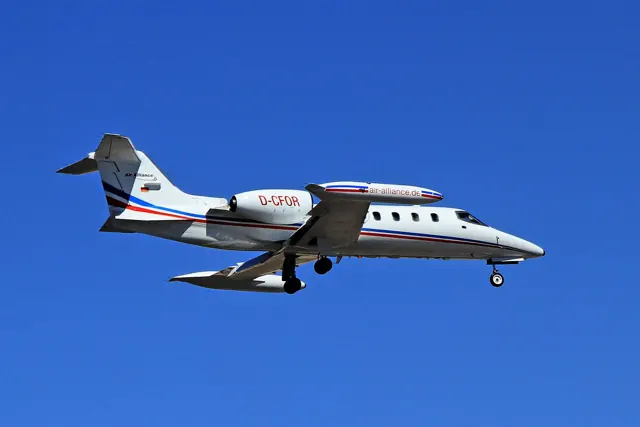
Learjet 35A — original MSFS release · Flysimware · MSFS 2020 · MSFS 2024
Choose the correct manual and navigator
The original release has its own v1.4 manual, distinct from the native-2024 product. Its opening pages warn that some controls require the supplied binding documentation and that the TDS GTN750Xi option is not available on Xbox. The cockpit index covers the autopilot, fuel controls, engine start, anti-ice equipment and EFB.
Original MSFS manual v1.4, PDF pp. 1–5
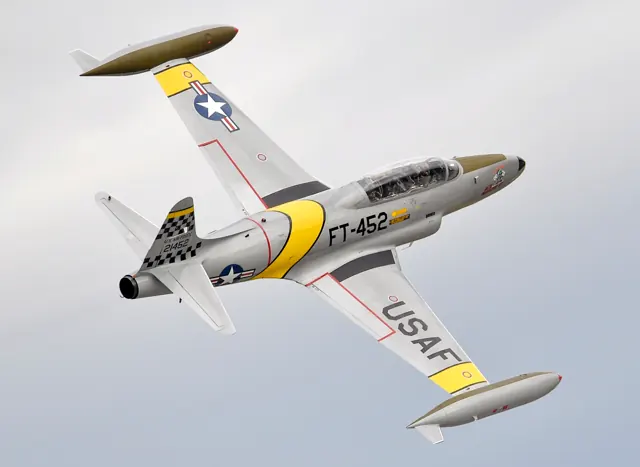
Lockheed T-33 Shooting Star · iniBuilds · MSFS 2020 · MSFS 2024
The modern cockpit adds familiar civil avionics
The illustrated modern panel includes a G3X Touch, GNS 430, GTX 330 transponder and GMC autopilot controller. The rear cockpit follows the corresponding classic or modern layout.
MSFS 2024 manual · PDF pp.30–32
F-4E, F-4J and FGR2 Phantom · DC Designs · MSFS 2020 · MSFS 2024
Documented product features
DC Designs groups F-4E, F-4J and FGR2 models in one MSFS product. The listing describes a hydraulic system and pitch/bank-hold autopilot. These features are scoped to DC Designs and do not describe the existing X-Plane default Phantom pages.
Product listing · aircraft variants, hydraulics and autopilot
McDonnell Douglas MD-82 · Laminar Research · X-Plane 12
A separate reference for the bundled MD-82
Laminar's guide identifies the MD-82's pitch-trim wheel and autopilot systems and provides illustrated cockpit locations. This guide covers the bundled aircraft. Rotate's MD-80 has separate systems documentation.
Archived simulator manual; installed package revision not observed · PDF pp.8,18,50
McDonnell Douglas MD-82 · Laminar Research · X-Plane 11
A separate reference for the bundled MD-82
Laminar's guide identifies the MD-82's pitch-trim wheel and autopilot systems and provides illustrated cockpit locations. This guide covers the bundled aircraft. Rotate's MD-80 has separate systems documentation.
Archived simulator manual; installed package revision not observed · PDF pp.8,18,50
MU-2 · Microsoft Flight Simulator · MSFS 2024
An illustrated guide to the MU-2 cockpit
The MU-2's centre console carries an autopilot panel below the trim lever. The guide describes separate heading, localiser-capture, glideslope and altitude-hold modes. Selecting ALT holds the current altitude; a separate turn control commands bank, while the vertical-speed selector provides climb or descent control.
iniBuilds MU-2 manual v1.0.1, 9 September 2023; documented simulator behaviour · PDF p.24
MU-2 · Microsoft Flight Simulator · MSFS 2020
An illustrated guide to the MU-2 cockpit
The MU-2's centre console carries an autopilot panel below the trim lever. The guide describes separate heading, localiser-capture, glideslope and altitude-hold modes. Selecting ALT holds the current altitude; a separate turn control commands bank, while the vertical-speed selector provides climb or descent control.
iniBuilds MU-2 manual v1.0.1, 9 September 2023; documented simulator behaviour · PDF p.24
F-5E Tiger II · SC Designs · MSFS 2020 · MSFS 2024
Controls and systems in the developer manual
The SC Designs manual says its F-5E has neither fly-by-wire nor autopilot. It calls for manual trim and explains that approach speed varies with aircraft weight.
Manual captured 28 September 2026; PDF pp. 6, 12, 14
FlightFX P.180 Avanti II · FlightFX · MSFS 2020 · MSFS 2024
Coordinated surfaces and trim
The manual identifies aileron cables and bellcranks and elevator rods and cables. Pitch trim changes stabiliser position, while roll trim acts through the right-aileron servo tab. Forward-wing and main-wing flaps operate in coordination. Autopilot autotrim and yaw damping have separate functions.
FlightFX P180 manualv1.6.1 Rev2025-02-06, PDF pp.35-36 and87
Emerald Scenery Design Pietenpol Air Camper · Emerald Scenery Design · MSFS 2024
Cockpit configuration and assistance
The manual lists no wing flaps. Its carburettor heat uses the simulator's Spoiler axis, while the EFB and silent autopilot are convenience features. The published cruise range is 70–75 mph, with an approximately 35 mph stall figure.
Pietenpol Air Camper v1.1.0 manual; PDF pp.3–4, 7–9 and custom-variable tables
Pietenpol Air Camper
The Air Camper is a 1930s-era homebuilt with a parasol wing supported by external struts above the open cockpit. Wood and fabric form most of its construction. Emerald's rendition uses a four-cylinder, 65 hp Continental A65.
The MSFS 2024 package includes Classic and bushwheel configurations, an EFB and silent autopilot assistance. The EFB and autopilot are simulator convenience features.
Pietenpol Air Camper