Find aircraft background, systems descriptions and manuals for the aircraft you are researching. Each note keeps its source and version context close by.
Simulator manuals describe the developer’s implementation. Aircraft background is research-based; pilot accounts describe an individual’s experience. Coverage here is limited to the selected notes and linked resources, not the full contents of every manual.
Beechcraft T-34C Turbo Mentor
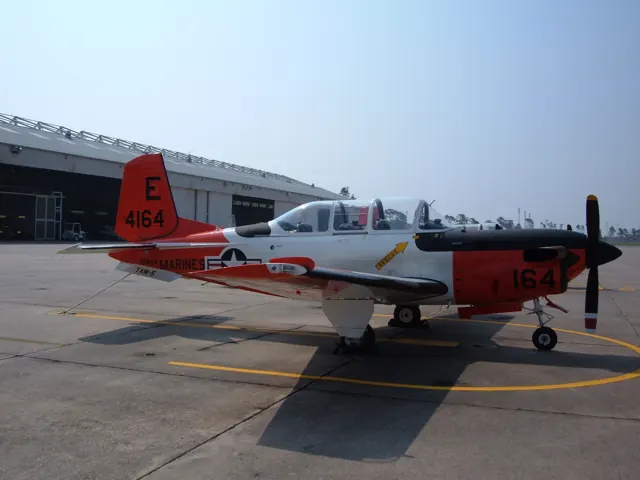
The T-34 began as a piston-powered military trainer derived from the Beechcraft Bonanza. The later T-34C Turbo Mentor replaced that piston installation with a turboprop, retaining the trainer’s tandem cockpit and low-wing layout.
JRollon chose the T-34C while work on the CRJ200 was paused. His product description lists both cockpits, custom sound and weather effects, and describes the older X-Plane 10 product as functional in X-Plane 11.
T-34C US Navy reference
Beechcraft T-6 Texan II
The Texan II is a turboprop training aircraft with tandem seating and retractable landing gear. The U.S. Air Force describes the T-6A as the aircraft used to establish the basic skills for later training tracks. Its contemporary cockpit and turbine engine belong to a separate aircraft lineage from the piston-powered North American T-6 that shares the Texan name.
AOA T-6A configuration · Blackbird T-6A manual · T-6A manual configuration
Bell 206 family · CowanSim · CowanSim · MSFS 2020 · MSFS 2024
The LongRanger searchlight has separate on/off and aim controls
The 206L3 guide maps searchlight power to TOGGLE TAXI LIGHTS. Directional landing-light bindings aim it, and the HOME binding restores the default position. The documented four-way cockpit switch supplies another way to move the light.
Gathered Cowan 206L3 manual · PDF p.12
Bell 206 family · CowanSim · CowanSim · MSFS 2020 · MSFS 2024
Cockpit switches and bindings can expose different positions
The 206B3 guide describes a three-position landing-light switch in the cockpit, while the hardware binding provides only on/off operation. Its starter is a toggle that must be cycled off before another start.
Gathered Cowan 206B3 manual · PDF pp.10–11
Bell 206 family · CowanSim · CowanSim · MSFS 2020 · MSFS 2024
Stability assistance and upper modes do different jobs
Cowan's HeloSAS uses small cyclic corrections to stabilise the helicopter. The manual distinguishes force-trim behaviour with SAS engaged and disengaged, and explains the difference between spring-centred and non-centring controls. Its upper autopilot modes become selectable above 44 knots in the documented implementation. Stability assistance, rotor-speed governing and route-following modes are separate systems.
Archived document; installed package version not observed · PDF pp.1-2
Bell 206 family · CowanSim · CowanSim · MSFS 2020 · MSFS 2024
Two different meanings of trim
On Cowan's 206B3, engine trim adjusts the governed rotor-speed setting, while rotor trim changes the cyclic trim state. The latter has its own reset binding. The guide also records the hydraulic-switch binding limitation for this version.
Archived document; installed package version not observed · PDF pp.4-5,9
Bell 206 family · CowanSim · CowanSim · MSFS 2020 · MSFS 2024
LongRanger controls have their own guide
The 206L3 manual separately documents engine-RPM trim, longitudinal and lateral cyclic trim, and cyclic trim reset. It also identifies a hydraulic-switch hardware-binding limitation. These assignments cover the LongRanger package.
Archived document; installed package version not observed · PDF pp.4-5,9
B-206 · FlyInside · MSFS 2020
Choose the flight model through FlyInside Heli Manager
FlyInside’s guide represents a 1982 206B-3 with a 250-C20B engine. The Heli Manager offers Easy, Medium and Realistic modes, with further controls for cyclic sensitivity, stability and engine failures. Those settings change the package's control response and assistance.
Gathered FlyInside guide · PDF pp.3,12–13
B-206 · FlyInside · MSFS 2020
Throttle and starter bindings are documented separately
The guide accepts Set Helicopter Throttle Axis or Propeller 1 Axis for the twist throttle, with increase/decrease alternatives for buttons. It recommends Set Starter 1 for starting. These assignments are specific guidance for FlyInside and differ from Cowan’s documented controls.
Gathered FlyInside guide · PDF pp.10–11
B-206 · FlyInside · MSFS 2020
A developer-specific helicopter model
FlyInside's Bell 206 guide describes its own helicopter operation, including longitudinal and lateral force-trim bindings, governor adjustment and a hydraulic switch. The manual discusses the changing corrections needed as speed changes. The controls and flight model belong to FlyInside's implementation.
Archived document; installed package version not observed · PDF pp.11,17,21
Bell 206 family · CowanSim · CowanSim · X-Plane 11 · X-Plane 12
The X-Plane 206 uses Wing Sweep for the twist throttle
Cowan’s XP12 206B3 manual explicitly maps a hardware twist throttle to Wing Sweep. Its configuration menu also offers an automatic starter-button hold, allowing the pilot to manipulate the throttle during starting. These are simulator interface choices rather than real-aircraft control names.
Gathered Cowan XP12 206B3 guide · PDF pp.2–3,6
Bell 206 family · CowanSim · CowanSim · X-Plane 11 · X-Plane 12
Camera controls and AviTab extend the working cockpit
The Cineflex camera can be operated from the rear cabin or mapped to separate controls. Optional AviTab integration supports maps and PDF documents, including in VR. X-Plane’s Show Instrument Click Regions view exposes the model’s interaction points for easier cockpit exploration.
Gathered Cowan XP12 206B3 guide · PDF pp.4,9