FOR AIRCRAFT DEVELOPERS
Research aircraft and systems
Find aircraft background, systems descriptions and manuals for the aircraft you are researching. Each note keeps its source and version context close by.
Simulator manuals describe the developer’s implementation. Aircraft background is research-based; pilot accounts describe an individual’s experience. Coverage here is limited to the selected notes and linked resources, not the full contents of every manual.
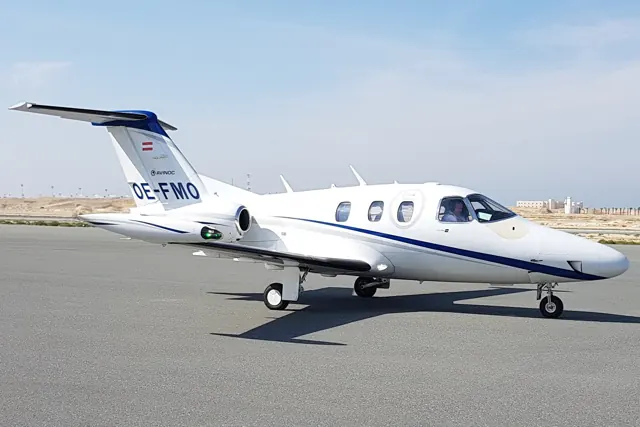
Eclipse 550
The 550 continued the Eclipse 500 design under Eclipse Aerospace and later One Aviation. It retains the compact, low-wing, twin-engine configuration and six-seat cabin arrangement of that lineage. The real aircraft was certified for single-pilot operation. The simulator listings identify each developer's avionics and supported versions.
Crossing the threshold
Thomas B. Haines · 5 August 2014
Dreams Do Come True
John Hayes · 23 September 2014
Eclipse countdown
Eric Whyte’s flight described by Dave Hirschman · 22 August 2017
Owners’ Analysis: Eclipse, Mustang, And Phenom
Gordon Feingold interviewed by Bill Cox · 23 July 2013
Optica · Microsoft Flight Simulator · MSFS 2024
The documented navigator is the Working Title GNS530
The manual pairs the Working Title GNS530 with the KAP140. GTN750 support depends on a separate third-party replacement package; its description is not evidence that one is installed.
Got Friends / Microsoft Optica manual v3, avionics section
Optica · Microsoft Flight Simulator · MSFS 2024
Ballast lights detect presence, not correct balance
The ballast indicators illuminate when the relevant compartment contains weight. They do not confirm correct balance; MSFS 2024 ballast and passenger weights are managed through the EFB.
Manual v3, ballast and EFB notes
Optica · Microsoft Flight Simulator · MSFS 2024
Headphones change the cockpit sound
Click the headphones to dampen the sound. The manual specifies clicking their cord to remove that effect.
Manual v3, virtual cockpit controls
Optica · Microsoft Flight Simulator · MSFS 2024
Camera equipment belongs to the research liveries
The camera system is limited to Scientific Research Series 300 liveries. IR-H and IR-C supply hot and cold grayscale views; EO colour imagery is day-only.
Manual v3, camera display
Optica · Microsoft Flight Simulator · MSFS 2024
Move the camera screen and adjust its image separately
Drag the camera display to reposition it. Its buttons adjust contrast, while the main panel’s Avionics Brightness knob controls brightness.
Manual v3, camera display controls
Optica · Microsoft Flight Simulator · MSFS 2024
The MSFS 2024 EFB tracks the checklist
Interactive checklists in the MSFS 2024 EFB include cockpit locators and progress tracking. The manual describes the MSFS 2020 checklist interface separately.
Manual v3, MSFS 2024 checklist section
Optica · Microsoft Flight Simulator · MSFS 2024
Observation-aircraft layout with modern navigation options
Got Friends documents a KAP140 autopilot used with the Working Title G530, along with pilot and copilot autopilot/trim-disconnect controls. Crew-dependent ballast options are also described. The loading options account for occupants in the forward cabin.
Archived simulator manual; installed package revision not observed · PDF pp.5-7